
Media links December 9, 2014

In honor of knocking out yet another final project for this semester I present some media links. I've got two finals down and one to go. This last one might be the most fun one of them all, since it's a sound project.

Dear Podcasters - Chris Brogan

Dear podcaster: I’m really glad that you were kind enough to invite me to be a guest on your show. It means a lot that you think my ideas will be of value to the community you serve. I really want to share a few things with you before we get started.

Star Wars: X-Wing Special Edition - gog

I remember playing this game for hours. If someone is looking for a Christmas gift idea for me, this would be a pretty good one.

This Artist's Images Integrate Code From Malware Like Stuxnet and Flame - Andy Greenberg - WIRED

Hoff creates his malware-glitched works, which have all already been sold, by dropping digital paintings into a hex editor that converts it to text. Then he intersperses randomly chosen chunks of code from malware files, and reconstitutes the data as an image file. The code corrupts the image in unexpected ways, adding chromatic streaks, blotches, and static. In two of the images, Hoff used code from the NSA-created software Stuxnet, built to destroy centrifuges at Iranian nuclear facilities. The other 14 images use code from Flame, which Hoff calls by its alternate name Skywiper, an older NSA-created spyware program.
Soundscapes: baseball, a walk to work, and trains

Last December I bought my self a Zoom H4n, a portable recording device. I primarily wanted it so that I could record podcast episodes on the go. What I've found, though, is that it's great for collecting sound for soundscapes.

I made this while I was at Spring Training in March.

I have several more minutes of sound than what is presented hear. I wanted to keep the track relatively short while still getting in all the interesting sounds I wanted, so it is an edited soundscape, though, I would be very impressed if you could tell where all the cuts are.

A few weeks ago I made another soundscape as part of a project for my sound design class.

That's my walk into work. This is unedited.

Finally, this is one from my MART 110 class at the University of South Carolina a few semesters ago.

We were supposed to create a soundscape that attempted to elicit some emotion from the listener. The basis for this was from the movie The Shining which has some pretty killer sound work. The one scene that kept sticking in my head while working on this project was when Wendy was pushing the cart through the hotel. That scene reminded me of trains, so I decided to find some train sounds that I could edit together.

Subway sounds are some of the most unsettling eerie sounds and those are the sounds i eventually settled on.

I have audio for two more soundscapes that I plan to release. One is from a class final and the other is from a baseball game that had a heckler.

Twitter: Star Wars, bugs called bash, and cartoons

How to make a GIF: recording

How to make a GIF: the tools

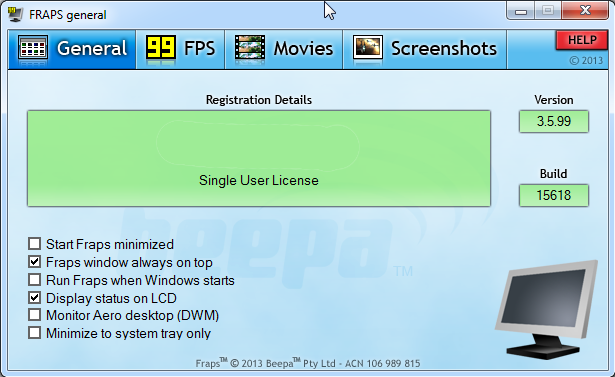
I usually use FireFox to record MLB.TV with FRAPS. When you launch a game using MLB.TV it opens it’s own Flash player window. Flash is recordable, the rest of FireFox is not. For ESPN3 and some other stuff I used to us Chrome, because FRAPS would record the entire browser window. Unfortunately, it looks like an update to Chrome has taken that function away. If I manage to get it working again I'll make sure to update this post.

When FRAPS is launched there will be taps for Frames Per Second (FPS) display, Movies and Screenshots.

On the FPS tab, You can hide the FPS or place it one of the four corners of your browser. I like to have it up so I can see when it’s recording and when it’s not. When Fraps is recording it will turn the FPS numbers red and record at the rate you have selected. I record at 30 FPS. I’ve found that any higher you’ll start to get into some performance issues and space issues with your computer. Any lower and you’re taking some quality hit. What’s best for you may depend on your hardware. Feel free to play around with the setting, but I’ve found 30 FPS to be the sweet spot for me.

I would recommend that you set the storage setting to break up your recorded video to 4GB increments. You can put it all in one big file, which is fine for short videos, but sucks for a three hour long game that you might need to go back through. 4GB increments will make it much easier to find and trim your video.

For recording you’ll want to set a hotkey. Go to the Movies tab and click in the 'Video Capture Hotkey' field. Then type the key you want to set as your hotkey. When you want to record hit the hotykey and you should see the color of the FPS numbers change from yellow to red, indicating the recording has started. A three hour game will fill up your hard drive quickly so make sure you have plenty of hard drive space to do the recording, if you intend to record the whole game. I have a 4TB drive that I use for my recording and that lasts me several games. Which has come in handy when GIF requests were made for several games back.

And that's recording in a nutshell. Leave questions or comments on the software you use for recording video in the comment section below.