
• Explore
  • Blog
  • Podcast
  • Community
  • About
  • Services
  • Contact
Menu

Exploring Information Security

Securing the Future - A Journey into Cybersecurity Exploration
  • Explore
  • Blog
  • Podcast
  • Community
  • About
  • Services
  • Contact

Threat Modeling an application

7 Tips and Best Practices for Threat Modeling

February 28, 2024

In the ever-evolving landscape of cybersecurity, threat modeling emerges as a crucial practice that helps organizations identify, assess, and mitigate potential security threats. It's a proactive approach that focuses on understanding the assets that need protection, identifying what threats those assets might face, and defining measures to mitigate those threats. Here are some essential tips and best practices for effective threat modeling:

1. Start Early and Integrate Continuously

Begin threat modeling at the earliest stages of system design and continue to integrate it throughout the development lifecycle. Early integration helps in identifying potential security issues when they are easier and less costly to resolve. Studies has shown the fixing issues later in development or IT project are more costly.
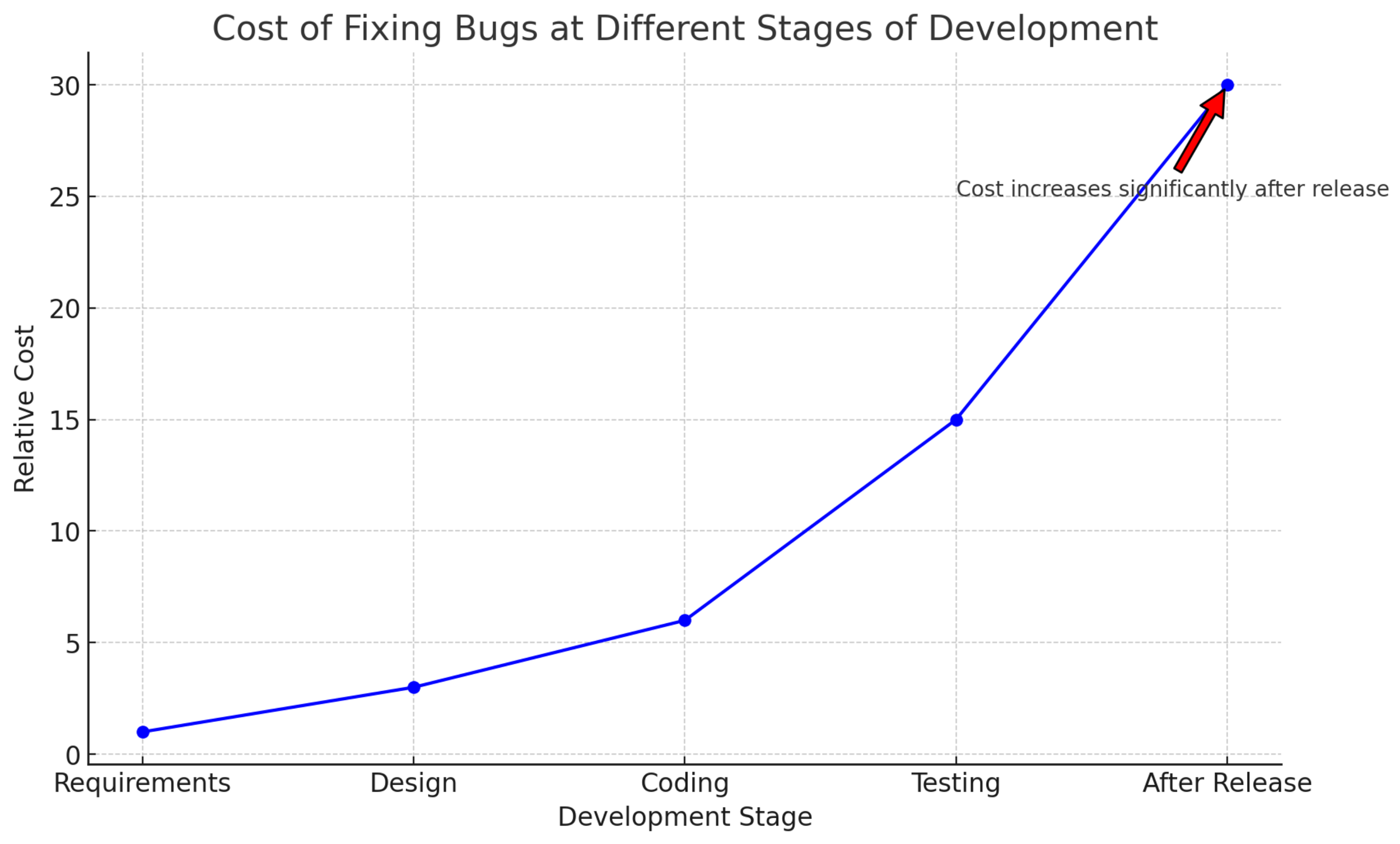
A chart showing the cost of fixing a bug throughout the development lifecycle

2. Involve a Cross-Functional Team

Threat modeling should not be the sole responsibility of the security team. It requires a collaborative effort involving developers, operations, architects, and business stakeholders. Each group brings a unique perspective that contributes to a comprehensive understanding of the system and its potential vulnerabilities.

There are other benefits to threat modeling outside of security. It get’s everyone involved in the project on the same page. Often development and infrastructure teams can be at odds about what needs to be done to complete the project. Threat modeling is an opportunity to bring everyone together to better understand and clarify what needs to get done.

3. Watch for scope creep

Identify what is being discussed at the start of the session. This will help setup boundaries for the discussion. People will want to dive into are other topics adjacent to the project. While they may need to be discussed at some point now is the time to discuss what was defined in the scope. I often will tell people let’s setup another session or move the discussion to later in the meeting if there’s time. This will help the meeting run more smoothly and ensure the topic of discussion get’s threat modeled.

4. Keep the Attacker's Perspective Simple

Thinking like an attacker can provide invaluable insights into potential vulnerabilities and attack vectors. Understand the capabilities, motives, and methods of potential attackers to better anticipate and counteract their actions. Not everyone has an attacker mindset. Most people in an organization are builders. We as attackers are looking to tear things down and break them.

This can take some getting used to for people. It may take multiple sessions before they start getting into the attacker mindset. It’s a lot like exercise. It takes time to build up those security muscles but once it happens it will make the meeting run a lot more smoother. I often start with simple attacks such as offering someone a million dollars for their access.

5. Use silence

As I’m drawing out a diagram, I will often be thinking of attacks. This isn’t necessarily the case with people outside of security. Especially, if threat modeling is new to them. If I provide all the attack scenarios it won’t help the others in the room foster that security mindset. Use silence to get people engaged in the discussion.

Most people are uncomfortable in a group setting with silence. The facilitator of the session will need to get comfortable with silence. After a period of time someone will speak up with an idea. Don’t shoot down all ideas. Write them down like you would a brainstorming session. This will help encourage more people to speak up with their ideas.

6. threat modeling discussions are chaos

If it feels like chaos you’re likely doing it right. As you go through the session you may feel like you’re taking a step back and adding things to the diagram or the security profile. That’s okay. Keep your eraser tool handy because you may need to adjust different things on the diagram. I’ve been in sessions that I thought were going to take 20 minutes and they ended up taking three hours.

7. Meeting notes and action notes

Identify someone to help take notes. This will with more thoroughly document the meeting. Governance Risk and Compliance (GRC) folks are great at this. After the meeting ask for the notes to compare with your own. Virtual meetings can be recorded for later viewing and ensuring notes are complete.

After the meeting send the meeting notes, a picture or screenshot of the diagram, and action items. This will help document the meeting and allow anyone to make corrections on the notes. Action items are important for any follow up items that need to be addressed. Make sure to identify a person to follow up with and not a group. Also, it doesn’t hurt to document these in a central repository that everyone can access.

Conclusion

Threat modeling is an essential practice in the toolkit of cybersecurity professionals. Threat modeling sessions can often feel like chaos and that’s okay. Make sure to start early and integrate into development and IT projects. Involve anyone that has work to be done as part of the process. Watch for scope creep and offer to set up another time to discuss. Use silence and keep the attacks simple to get people engaged in the conversation. Finally, remember to document each discussion, assign action items, and give people the opportunity to make corrections on the topic discussed.

Threat modeling is one of the low cost and most effective tools in your organization. These tips and best practices will ensure that threat modeling being performed at an organization will be efficient and effective. Leave a comment below if you have any tips or best practices for threat modeling.

Subscribe

Sign up with your email address to receive news and updates.

We respect your privacy.

Thank you!
In Advice Tags Threat modeling, Best Practices
Comment

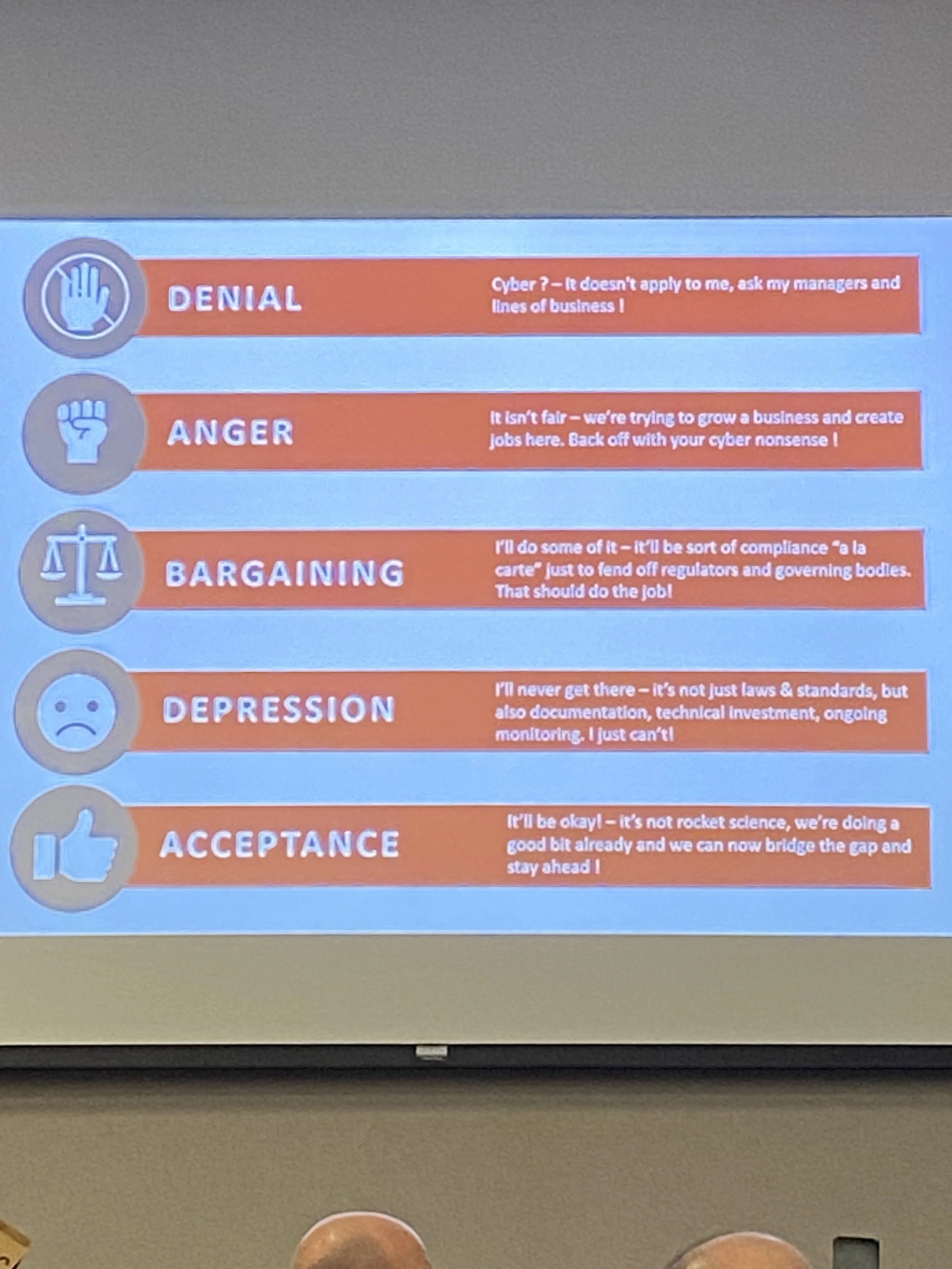
The five stages of cybersecurity grief from Mathieu Gorge at the 2024 Palmetto Cybersecurity Summit

Impressions from the 2024 Palmetto Cybersecurity Summit

February 26, 2024

Last week I had the pleasure of attending the 2024 Palmetto Cybersecurity Summit in Columbia, SC. It was a great conference with a good venue and really great speakers. The keynote speakers brought a really great insight and of course the hot topics was artificial intelligence (AI). I’m hoping to attend again next year!

Prior to the conference I presented at ColaSec which is a local cybersecurity user group that I helped start about 10 years ago. I gave my threat modeling talk that I presented at the conference the next day. I like using ColaSec as a first run for my talks because I get a lot of really great feedback to refine the talk. You can watch the talk on ColaSec’s YouTube page. I adjusted the acronyms section and made some other minor adjustments to make the talk flow better. That helped for the conference the next day because I realized I had 10 less minutes for my presentation due to a reading error.

What I’m really excited about for this years conference is doing a demo of a live threat modeling session. I have about 20-25 mins of content and then we get into the demo. I like it because I want people to get a feel for how a threat modeling session should flow. I am planning to switch up the demo for each talk so that each version is a little different.

One of the things I rate conferences on is the drinks and food. I’m happy to report that the conference got an A in both regards. They had tea which is great because I’m not a coffee drinkers and the food was pretty good. Sometimes you go to a conference and the food is just meh or in a box. This was not the case for this conference. The other thing to call out is the chairs. Big comfy adjustable chairs. You could spend all day in those chairs.

The keynotes were really great. Mathieu Gorge talked about cybersecurity from a broader global level and the 5 Pillars of Security Framework. The picture above is the five stages of cybersecurity grief. William MacMillian was the former Chief Security Information Officer (CISO) at the Central Intelligence Agency (CIA) and he talked about his experience taking over there right before Solarwinds came out. He also talked about platform centric vs best-in-breed and how platform can provide simplicity to security teams that live in a world of complexity. Both provided some different perspectives and insights on the cybersecurity landscape and dropped some thought provoking ideas.

The majority of talks I attended were around AI. Before I get to that though I also went to Michael Holcomb’s talk on industrial control systems (ICS/OT). He gave some really good insights but more impressive he put together free ICS/OT courses on YouTube for people looking to get into the ICS/OT space.

The second day was filled with talks on AI. That will be a thing throughout this year and potentially for the next 2-3 years. I love that it’s something new to learn. A lot of the conferences I’ve attended in the last few years haven’t really provided me with the opportunity of learning new things. A lot of the talks just confirmed my own ideas and thoughts around security topics. Nothing really challenged those ideas either. There is value in confirming my knowledge and experiences but I want to continue to learn. AI is that current topic.

Dr. Sybil Rosado talked about the social engineering aspects of AI. While she talked about some of the malicious uses of AI she was a big proponent of using AI and learning how to work with it. She’s a professor at Benedict College in Columbia, SC, and has seen students using it. She actually likes that it’s making the writing better. Dr. Donnie Wendt talked about deepfakes and how they’re playing a role in the world today. It’s super easy to use and get started with. My own thought is that deepfakes are a great way to improve a security awareness program simply by talking about it and showing some examples. Plus there are already attacks where someone is using AI to imitate a voice and ask for money to be sent. Finally, Tom Scott talked about managing your security program with AI. One nugget that really stuck with me was that AI does not remember your interaction in a new chat. To continue to train it you need to keep the same chat.

The conference was a really great start to the year for conferences. I learned some new things, got to meet some new people, and catch up with some people I haven’t seen in a while. I’d definitely recommend checking it out for next year. Talking to one of the organizers it sounds like it’s going to get even bigger.

In Experiences Tags AI, Security Conference, ICS/OT
Comment

Logs somewhere warm

Exploring Information Security - Change Log - February 16-22, 2024

February 23, 2024

This is a log of changes to the site over the last week.

New pages:

Resources for Threat Modeling - A page I put together for my talk on threat modeling

Content From Threat Modeling Conference Talks - A place where I will drop videos and slides of my talks from my threat modeling talk


Podcast posts:

What is a Canary? - My conversation with Tyron Kemp of Thinkst Canary on canaries

ShowMeCon: Bypassing MFA with Brandon Potter - A sponsored podcast episode by ShowMeCon on bypassing MFA

Blog posts:
Tools and Resources for Effective Threat Modeling - I share tools and resources for threat modeling

Threat Modeling at BSides Nashville 2024 - I will be at BSides Nashville May 11, 2024, to give my threat modeling talk

How to Become a Cybersecurity Kevin Bacon - I talk about my tips and experiences networking in the infosec community

Subscribe

Sign up with your email address to receive news and updates.

We respect your privacy.

Thank you!


In Website Tags website, change log
Comment

Be a cybersecurity Kevin Bacon - Image created with the help of ChatGPT

How to become a Cybersecurity Kevin Bacon

February 21, 2024

The Six Degrees of Kevin Bacon proposes that anyone in the Hollywood film industry is linked to Kevin Bacon within six steps. I’ve somehow had the title applied to me by a few different people. A large part of that is the networking I’ve done in the industry. I’ve hung out and talked to a lot of people. I don’t know everyone in the industry but I have meet people for the first time and we’ve known similar people. In this post I want to cover the networking that may have put me in the same breadth as Mr. Bacon.

My gamer tag is Jeditimmy

Attend Conferences

My very first conference when I got into security was BSides Charleston in 2013. I went down with a buddy to the conference and meet a few people. One of those people that stood out was Evan Davison who goes by the hacker name Pentestfail. He gave a great talk on defense in-depth (this is the same talk at a ISSA local chapter). Evan and I would cross paths multiple times over the next 10 years. We would volunteer and get to know each other at BSides Augusta and the Social Engineering Village at DEF CON.

It’s not just about attending conferences it’s about getting involved and interacting with people. That could be meeting and talking to people, participating in capture the flag competitions, volunteering, or speaking. If you’re nervous about meeting people volunteering is a great way to meet and interact with people.

At one point I was going to 8-10 conferences a year. Most conferences were one day events within a a five hour driving distance so it was only a day or two. Still that’s a lot and it’s not something I’d necessarily recommend as I did get burned out and decided to tone back the conference attendance to three in 2019. There was also the cost. My company did always cover travel. I got maybe one a year. The rest was on my dime but I will say it was worth it for the connections I was able to build within the community.

Going to events allows for shared learning and job opportunities. I’ve learned a lot from just talking to people in the hallway at conferences. It’s a safe space for sharing interesting stories that you wouldn’t hear otherwise. If you’re the type that has a hard time starting a conversation, ask questions. People love talking about themselves and sharing their insights into the industry. I’ve had entire conversations with people who never asked a question or knew my name but I knew a ton about them and got some really great security stories.

Volunteer at events

When I first started attending conferences I would volunteer. This forced me to meet people and as a bonus got me a free ticket into the conference. To get away from registration or door duty I started asking organizers if I could bring my camera and shoot pictures for them at the conference. This was great because I got to be more mobile and allowed me to meet and talk to a variety of people at the conference.

This also opened the door for invitations to work other conferences where my travel expenses were covered. If you have an interest see if it fits into helping out with a conference. I know several people volunteer just to do video for a conference. I’ve also seen people contribute by providing a quilt that was auctioned off. Find something you feel can contribute to the conference. Working the registration desk is also fine.

Volunteering helped me get a really great job in Nashville, TN. I had been traveling to BSides Nashville since it’s inception. There was an opening at a company one of the organizers was working at. I didn’t know that organizer really well but when they were asked about me for the position they responded that I showed up and did my job. Not necessarily a glowing endorsement but it helps and you never know who you’re going to interact with while volunteering.

Attend Local User Groups

Local user groups are great if you’re looking to network within your own city. If there’s not one I’d recommend starting one up. It’s definitely a lot of work but very rewarding. When people ask me my greatest accomplishment I often will tell them it’s starting a local user group in Columbia, South Carolina, that has 20-25 regular attendees. That’s massive for a local user group by the way. If you need guidance on starting a local user group there’s a couple podcasts for that.

How to Start a Successful CitySec Meetup - Part 1

How to Start a Successful CitySec Meetup - Part 2

Starting the local user group allowed me to meet a lot of people in town. You never know if you’ll meet your future employer or someone that starts their own company. I had both those experiences starting a user group. The first was switching to a different state department after meeting the South Carolina state CISO at a meetup and going to lunch with him.

The other is meeting Andrew Morris who is the founder of GreyNoise a company that’s starting to make waves in the cybersecurity community. I met him at a conference called Trends in 2015 where he told me about his idea for the company. I’ve had him on the podcast a couple of times to talk about being a pentester.

Start a blog or podcast

Speaking of podcasts, most people don’t know that I had a podcast prior to my security podcasts. I ran The Crawfish Boxes (TCB) podcast for the Houston Astros fan site on SB Nation. I gained some notoriety with the Houston Astros organization due to that podcast and blogging I did for TCB. It’s amazing how more accessible people become when you offer to interview them. I have a big leaguer or two in my cell phone and at one point had two baseball General Manager’s following me on Twitter.

I took the lessons and experience from covering baseball and brought it into the infosec community and it has really helped my career. I’ve gotten to meet and talk to a lot of great people in the field on my podcast. I’ve had a lot of success just reaching out and asking people if they’d be interested in talking about a topic they’re presenting on or have blogged about. There are people who never responded or responded and then stopped responding but more often than not I can get an interview set up with them.

One of the hardest things getting started is imposter syndrome, “Why would people want to listen or read me?” “Someone else is already doing what I would want to do.” I had those same thoughts but went ahead because I have my own unique perspective to offer. It’s still nerve-racking but the longer I did it the more I realized I have something to offer to the community. I love having a conversation with people and learning more about what they know. Which made podcasting a great fit.

Blogging, on the other hand, is the one I’ve struggled with. I was never good in English class and if I had concerns about podcasting and what people thought my writing is on a much higher level of imposter syndrome. But blogging isn’t about perfect English, it’s about sharing a unique viewpoint. English and grammar help but it’s more about the idea and finding my voice. Plus, the more I do it my writing is bound to improve, right? Right? AI is something I’m leveraging as an assistant. It’s not always great but it can help.

Summary

To be a Kevin Bacon you gotta get out there. Attend conferences and local user groups. You’ll get to meet a lot of really great people. If you struggle with talking to people volunteer. It can force you to meet people and show your willingness to contribute to the community. Start a blog or podcast or vlog. Putting yourself out there can help you grow as a professional and open up doors. If blogging or podcast aren’t your thing that’s okay. Identify what you’re interested in and see how that can fit into the community. There’s a lot of ways to contribute. Contributing to an open source project or participating in a capture the flag event can do similar things for your career. Find ways to get involved.

In Experiences, Advice Tags Kevin Bacon, Networking, security conferences, local user group, citysec
Comment

This way to BSides Nashville - From BSides Nashville 2016.

Threat Modeling at BSides Nashville 2024

February 20, 2024

I’m excited to announce that I will be speaking at BSides Nashville May 11, 2024. I will presenting my threat modeling talk which I’ve been blogging about the past couple of weeks. I’ll link the blog posts to the talk and pictures for past BSides events below. I’ve been going to BSides Nashville since it started in 2014. The first few years I attended I lived in Columbia, SC, which meant a seven hour drive to attend the conference. In 2016 I moved to Nashville and now consider it my home BSides conference.

It’s a really great event with a lot of great speakers and great spot. It’s also Nashville so getting into some fun (or trouble) is right around the corner. Prior to the pandemic they used to sell out 300 tickets very quickly. Post-pandemic they’ve struggled to get back to those number but so has every other local user group and conference. I’m expecting this year to be a big year for conference attendance not only for myself but the community. I believe people are ready to get back out there. More importantly the job market is influx and a lot of people are looking for jobs. The best way to do that is to get out and network with people at local user groups and conferences. If you’re planning to attend reach out and we can meet in person!

Threat modeling blog posts:

  • Why Threat Modeling is Important

  • What is Threat Modeling?

  • Basics of Threat Modeling

  • Methodologies and Approaches for Threat Modeling

  • Threat Modeling Risk Management

BSides Nashville Pictures:

NashBsides8.JPG
BSides Nashville 2014

Bsides Nashville, TN, May 17, 2014.

BSidesNash_Panorama1.jpg
BSides Nashville 2015

BSides Nashville, TN, April 11, 2015.

DSC_2691.jpg
BSides Nashville 2016

BSides Nashville, TN, April 16, 2016

BSides Nashville 2017

Nashville, TN, April 22, 2017

BSides Nashville 2018

Nashville, TN, April 14, 2018

BSides Nashville 2019

Nashville, TN, April 13, 2019

Subscribe

Sign up with your email address to receive news and updates.

We respect your privacy.

Thank you!
In Experiences, Media Tags Threat Modeling, BSides Nashville
Comment

Exploring tools and resources for threat modeling - Created with the help of ChatGPT

Tools and resources for effective Threat Modeling

February 19, 2024

My presentation for this year is Threat Modeling. My first stop is the 2024 Palmetto Cybersecurity Summit Feb 21-22, 2024, in Columbia SC. I’ll also be speaking at BSides Nashville May 11, 2024, and ShowMeCon May 13-14, 2024.

Getting Started

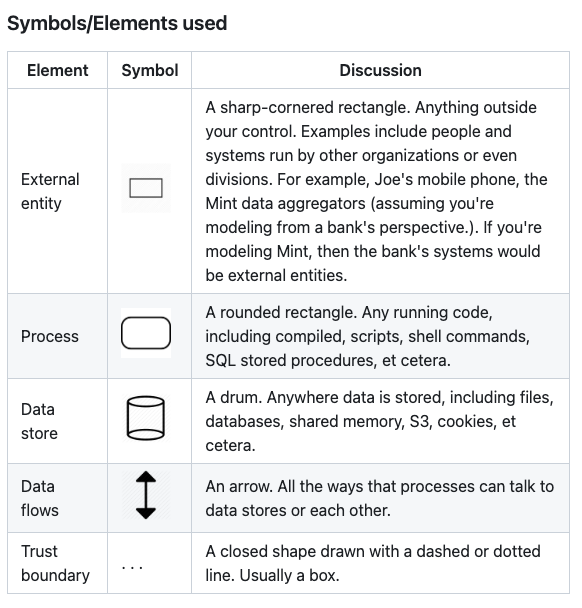
We’re going back to kindergarten people! We’ll get to draw shapes and lines and use different colored markers! To get started all one needs is a whiteboard and markers. Building out a diagram is the first step. As I mentioned in the Basics of Threat Modeling blog post having one prepared prior to the session will help expedite the process. Unfortunately, if there isn’t an existing diagram one will have to be done during the session. Adam Shostack has a description of the symbols and elements to use in a threat model on his GitHub page. They’re very simple and that’s the intention because threat modeling an application or process can get very complex.

Adam Shostack - DFD3 - https://github.com/adamshostack/DFD3

If the session is virtual and not in person the same principles applies. All popular video conferencing has a whiteboard feature on it that can be used for threat modeling. There are third-party options as well including:

  • Microsoft Whiteboard (Usually free with corporate account)

  • Microsoft Visio (License required)

  • Microsoft Threat Modeling Tool (Free)

  • OWASP Threat Dragon (Free)

  • Draw.io (Free)

  • Miro (Free version)

  • Lucidchart (Free version)

  • MURAL (Free version)

  • Whimsical (Free version)

The tools I’ve had experience with are Microsoft’s Whiteboard, Visio, and Threat Modeling Tool. Visio and the Threat Modeling Tool get into a lot of detail and can feel complex if you’re just getting started. The more important thing is learning the methodology and approach to threat modeling. Threat Dragon has a lot more simplicity. It is open-source so doesn’t have all the bells and whistles of other tools. It can take a little to get used to using. I’ve seen developers create diagrams with Draw.IO. It’s simple and easy to use but be mindful that if they build it on a third-party website they may be putting internal organization information on the internet. I have not used Miro, Lucidchart, MURAL, or Whimsical but they look similar to Draw.IO. Leave a comment below with your favorite white boarding tool.

Automated threat modeling tools

I have only used Microsoft Threat Modeling Tool and OWASP Threat Dragon for automating parts of the threat model process. Microsoft’s Threat Modeling Tool get’s very granular and tries to be exhaustive on attack scenarios. If you like digging into a lot of details it can be a very useful tool. OWASP Threat Dragon is a much lighter version of that which is why I used it a lot more. For me I wanted the group to come up with their own attack scenarios because it allowed them to exercise their security muscles and build a stronger security mindset. This impacts the other areas of their day-to-day work. As their working they’ll be thinking about security.

There are other commercial and open-source tools that promise one-click threat modeling. I have not had an opportunity to use them. Here are some popular ones I found:

  • IrisusRisk

  • Threat Modeler

  • SecuriCAD

  • SD Elements

If you have used one of these or another leave a comment below.

Educational Resources

The book I always recommend is Threat Modeling: Designing for Security by Adam Shostack. It is “THE” book on threat modeling. What I love about the book is that after the first chapter it says to just start threat modeling. It’s more of a companion book for learning and maturing the threat modeling program.

OWASP is another resource for threat modeling. They have an entire project on everything you need to know about Threat Modeling. The OWASP Cheat Sheet is also a great place to start and a good reference point while maturing the threat modeling practice. Finally, an exhaustive list of threat modeling resources can be found at Awesome Threat Modeling on GitHub.

Leave a comment below with resources or tools you recommend. If you’re interested in seeing a version of this talk check out the ColaSec Meetup page as I will be presenting on threat modeling at the February 20th, 2024, meetup. A virtual option for attending is available.

Subscribe

Sign up with your email address to receive news and updates.

We respect your privacy.

Thank you!
In Technology, Experiences, Advice Tags threat modeling, presentation
Comment

Logs somewhere cold

Exploring Information Security - Change Log - February 9-15, 2024

February 16, 2024

This is a log of changes to the site over the last week.

New pages:

Attack Tree Example - This is for my upcoming threat modeling talk.

Podcast posts:

How to Implement DAST - My conversation with Frank Catucci about implementing DAST

ShowMeCon: Kevin Johnson and whatever he wants to talk about - A sponsored episode by ShowMeCon with Kevin Johnson

Blog posts:
Basics of Threat Modeling - A blog post on threat modeling

Methodologies and Approaches for threat modeling - A blog post on threat modeling

Threat Modeling Risk Management - A blog post on threat modeling

Subscribe

Sign up with your email address to receive news and updates.

We respect your privacy.

Thank you!


In Website Tags website, change log
Comment

Explore threat modeling risk management - Created with help from ChatGPT

Threat modeling risk management

February 15, 2024

My presentation for this year is Threat Modeling. My first stop is the 2024 Palmetto Cybersecurity Summit Feb 21-22, 2024, in Columbia SC. I’ll also be speaking at BSides Nashville May 11, 2024, and ShowMeCon May 13-14, 2024.

In this post I want to talk about rating and prioritizing the discovered threats from a threat modeling session. We’ll get into the different methodologies and talk about some of the nuances of them.

Methodologies for Risk Management

Created with help from ChatGPT

DREAD

DREAD, an acronym for Damage, Reproducibility, Exploitability, Affected users, and Discoverability, is a risk assessment model used to prioritize threats. Although its use has declined due to its subjective nature and lack of business context alignment, some organizations may still find it useful for quick, high-level risk assessments.

This is what I use for threat modeling. If you read Adam Shostack’s book he calls it obsolete and recommends SDL Bug Bar. The reason is that the different categories can be a bit ambiguous, lack granularity, and context. I think it’s great for getting started and keeps threat modeling simple. As threat modeling matures there may be a need to mature the risk management and switch to something that provides more scaleability.

Using DREAD we would rate the threat by each theat on a 1-3 scale. This allowed for prioritizing low, medium, and high. The final number will help prioritize the threats discovered for follow up. Again, when dealing with other groups it’s important to keep the bar to entry low. As the program matures and people get a better idea on threat modeling advancing to something a bit more technical can be useful.

SDL Bug Bar

The Security Development Lifecycle (SDL) Bug Bar is a concept and a set of criteria used within Microsoft's SDL framework to classify and prioritize the handling of software bugs based on their security implications. The "bug bar" establishes a baseline for the security severity that a bug must meet or exceed to be considered a priority for fix before software can be released. It helps teams make consistent, informed decisions about which security vulnerabilities to fix and when to fix them.

There’s not really a lot available online for implementing the Bug Bar. There are some blog posts and the SDL Bug Bar PDF which doesn’t exactly give instructions on how to implement. It can be loaded as a template into other Microsoft tooling so that can be helpful and will help with streamlining some of the threat modeling process. Leave a comment below if you’ve had experience implementing the SDL Bug Bar.

OWASP Risk Rating Methodology

The Open Web Application Security Project (OWASP) offers a risk rating methodology that considers factors such as threat agents, attack vectors, technical impact, and business impact to prioritize vulnerabilities. This methodology is particularly useful for web application security and can be adapted to fit an organization's specific needs. This has more in-depth math and expanded categories for rating a threat. This could be another option for maturity.

CVSS (Common Vulnerability Scoring System)

CVSS provides an open framework for rating the severity of security vulnerabilities in software. It offers a standardized way to capture the principal characteristics of a vulnerability and produce a numerical score reflecting its severity. CVSS scores can help organizations prioritize their response and remediation efforts based on the potential impact of each vulnerability. This is one of the standards for vulnerabilities.

FAIR (Factor Analysis of Information Risk)

FAIR is a quantitative risk analysis methodology that helps organizations understand, analyze, and quantify information risk in financial terms. FAIR differs from other models by focusing on the financial impact of risks, making it particularly useful for making informed, data-driven decisions about cybersecurity investments and risk management strategies. This methodology was created by Jack Jones with the intent of providing risk in financial terms for organization.

TARA (Threat Agent Risk Assessment)

TARA identifies potential threat agents and evaluates the risks they pose to an organization's critical assets. This methodology is useful for organizations that want to focus on the most likely sources of threats and tailor their defenses accordingly. Intel created TARA as part of its comprehensive security and risk management strategy to identify, assess, and prioritize risks based on the potential impact of various threat agents. This methodology was created by the Department of Defense (DoD) in 2010. It uses built in attacks to assist in the risk assessment process.

Summary

There are multiple options for rating and prioritizing the threats identified in a threat modeling session. I like DREAD because it’s simple but that might not be feasible for larger organizations. If you’re a Microsoft shop the SDL Bug Bar may be a better fit. OWASP Risk Rating Methodology is also another option. If you really want to go deep CVSS or another framework may be the best option. FAIR and TARA are two methodologies that look to provide specific context to risk management. FAIR from a financial standpoint and TARA has a DoD lean. Choosing the best risk management methodology will depend on the organization and it’s needs. Try multiple and see what works best for your organization.

Next we’ll get into tools and resources for threat modeling.

Subscribe

Sign up with your email address to receive news and updates.

We respect your privacy.

Thank you!
In Experiences, Advice Tags Threat Modeling, Risk
Comment

Exploring threat modeling methodologies and approaches - Image created with the help of ChatGPT

Methodologies and Approaches for Threat Modeling

February 14, 2024

My presentation for this year is Threat Modeling. My first stop is the 2024 Palmetto Cybersecurity Summit Feb 21-22, 2024, in Columbia SC. I’ll also be speaking at BSides Nashville May 11, 2024, and ShowMeCon May 13-14, 2024.

There are a variety of ways to do threat modeling. Deciding which one to use will depend on the organization and what is being threat modeled. I started with STRIDE which is a standard methodology for getting started. We’ll touch on the other ones but I’ve not had experience with them. The basic concept should be the same. The methodologies are used to help guide a threat modeling session through attacking and mitigating the threats discussed.

MethodologieS

STRIDE

Developed by Microsoft, STRIDE is an acronym for Spoofing, Tampering, Repudiation, Information Disclosure, Denial of Service, and Elevation of Privilege. This model helps in identifying threats in these six categories, making it easier to systematically address potential security issues.

Repudiation is the one that always get’s me. It’s attackers getting in and performing illegal operations without leaving any sort of evidence. This is usually due to a lack of logging. The others are fairly straight forward.

LINDDUN

This is a privacy-focused threat modeling methodology designed to help identify and address privacy threats in information systems. The acronym LINDDUN stands for the seven types of privacy threats it aims to uncover: Linkability, Identifiability, Non-repudiation, Detectability, Disclosure of information, Unawareness, and Non-compliance.

PASTA

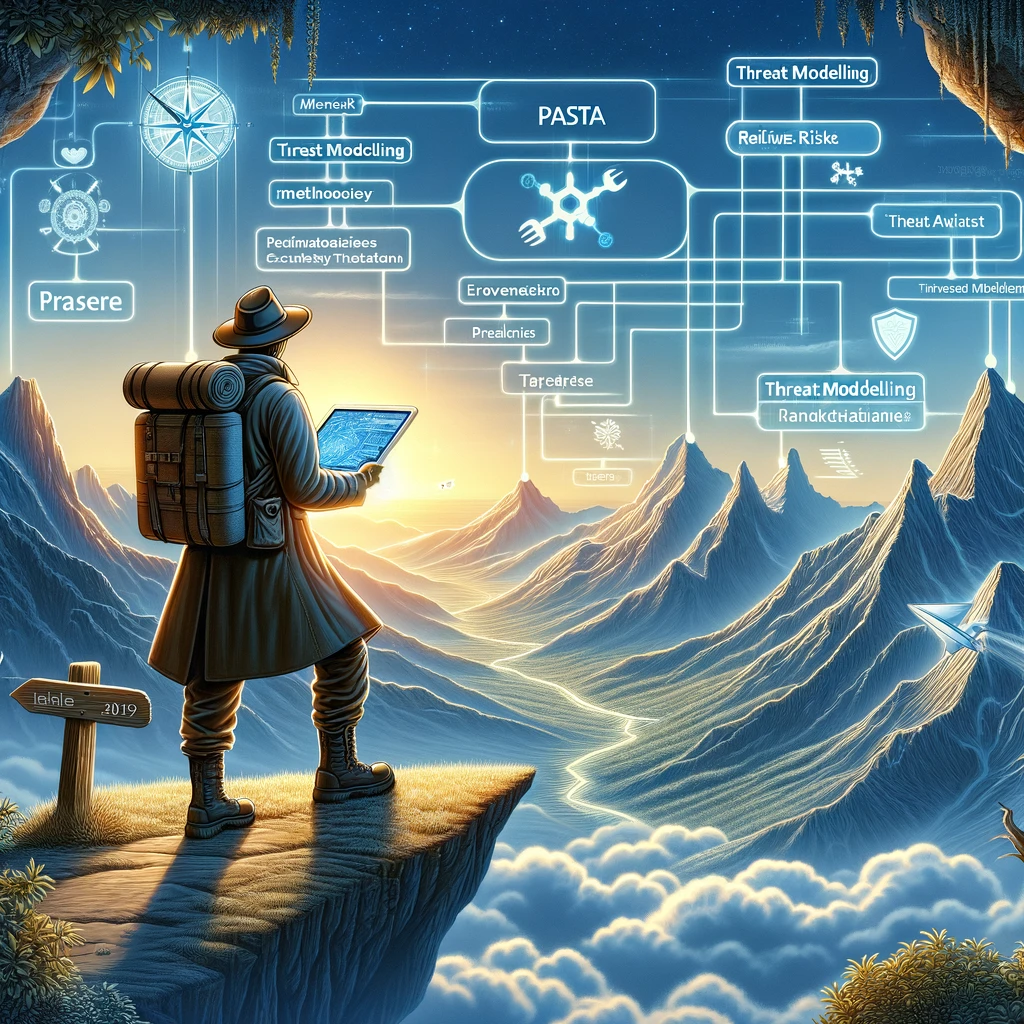
The Process for Attack Simulation and Threat Analysis (PASTA) is a seven-step, risk-centric methodology. It focuses on aligning business objectives and technical requirements, taking into account the attacker's perspective and potential attack vectors. It is thorough and integrates well with risk management.

OCTAVE

Operationally Critical Threat, Asset, and Vulnerability Evaluation (OCTAVE) is a suite of tools, techniques, and methods for risk-based information security strategic assessment and planning. It focuses on organizational risk and security practices, making it more suited for strategic, rather than technical, threat analysis.

Attack Trees

Attack Trees provide a methodical way of describing the security of systems, based on varying attacks. It's a graphical representation of potential attacks, organized in a tree structure, showing how an overall goal (root) can be broken down into sub-goals (leaves). This is an example of an attack tree.


Example of using STRIDE

Created with the help of ChatGPT

A threat modeling tweet by @thegrugq that highlights attack surface.

Below are some examples I’ve seen discussed in a threat modeling session. The skies the limit and will be different depending on the application or process. At the very least it’s a thought exercise that helps people think about security and discuss mitigating controls. Some of these attacks are more likely than others. Within healthcare insider threat and errors are a lot higher than other industries. They’re still susceptible to external attacks but the bigger concern may already be inside the organization. Each organization will have it’s own attack surface.

Spoofing

Threat: A healthcare provider uses another users logged in session when they walk away form their computer.

Mitigation: Ensure session timeout is set to what is needed for the business use case of the application. If a user has several activities that require waiting for something to finish in the application or they need to login into other applications and then come back then the timeout may need to be longer.

Tampering

Threat: A healthcare provider accidentally modifies the wrong record for two different patients.

Mitigation: Add a, “are you sure?” pop-up. Logging and recovery will need to be in place for identification and recovery.

Repudiation

Threat: A user (patient or provider) denies sending a message or making changes to records.

Mitigation: Implement detailed logging and audit trails to track user actions and changes within the application.

Information Disclosure

Threat: S3 bucket with patient information is accidentally made available on the internet.

Mitigation: Use access controls to enforce the principle of least privilege, ensuring users can only access information necessary for their role, and encrypt data.

Denial of Service (DoS)

Threat: A ransomware attack encrypts the web server.

Mitigation: Web server and all needed systems have good backups and can be restored to get the service back online for users.

Elevation of Privilege

Threat: A user is bribed to give up their credentials to the application.

Mitigation: User IP logging to help identify when a user logs in from an abnormal location.


Approaches

At my organization I was the person doing the threat model. I was training up some of the other people on my team so they could do it and not create a bottle neck with my department. Some organizations an individual or team may not be the best approach. In this case a decentralized approach could be more beneficial where the teams are trained up on doing their own threat models.

As far as automated tooling I haven’t used a lot of it other than as a substitute for a whiteboard. I have seen the use of Microsoft’s Threat Modeling tool which will help with attacks but will require a lot more interaction. There’s not really a wrong or right answer. I’ve shown a lot of value and made projects run more smoothly and with less threat introduced by using just a whiteboard and markers. Haven’t explore the automated threat modeling space but I do believe that you can’t replace a human. A one-push threat model would be nice it’s just not that easy and as I’ve learned in the industry there is no easy button.

Threat modeling should be done as early in the process as possible. However, it is very useful for legacy applications or applications with minimal documentation. I’ve used it a lot for getting a better understanding of how an existing application or process works, especially if there’s very little documentation. These sessions usually require multiple because as unanswered questions comes up and people are tasked with doing some discovery work. Once that discovery has been made the threat model continues.

Summary

STRIDE is a good place to start with threat modeling. There are other methodologies that could be more applicable to the organization. I’ve only ever used STRIDE because it was effective for what I was doing with threat models. Walk through the chosen methodology to get an idea on the attacks possible within the application. These attacks can be simple or they can be a bit more elaborate. A few simple examples will help with getting people to think about how to attack an application or process.

Approaches to threat modeling will differ between organizations. A group of security experts can make an effective threat model but it may not be scaleable. The other option is to train people within the projects to perform the threat model. Thinking about what could go wrong will get people into the mindset of looking for problems before they happen. The earlier a problem is discovered the less costly it is to fix. Threat modeling can also be used for discovery on existing applications or processes.

There are tools available for threat modeling. The simplest and often the most effective is a whiteboard and markers. Threat modeling is like any other security program. Get it started and then mature it over time. Try new things and evaluate if it’s useful or not. Just get started.

Next we’ll go over risk management and rating the discovered threats.

Subscribe

Sign up with your email address to receive news and updates.

We respect your privacy.

Thank you!
In Experiences, Advice Tags threat modeling, presentation
Comment

Exploring the basics of threat modeling - Image created by ChatGPT

Basics of Threat Modeling

February 12, 2024

My presentation for this year is Threat Modeling. My first stop is the 2024 Palmetto Cybersecurity Summit Feb 21-22, 2024, in Columbia SC. I’ll also be speaking at BSides Nashville May 11, 2024, and ShowMeCon May 13-14, 2024.

The basics of threat modeling starts with the understanding that it’s simply doing a data flow discussion. In fact, when I do these I name the meeting data flow discussion instead of threat modeling discussion. This allows people to come to the meeting with the mindset that it’s just a discussion about how data flows through an application or business process. And then we’re going to do naughty things to it.

The session itself is broken up into five parts:

  • Identifying assets and data flows

  • Establishing the security profile

  • Identifying potential threats

  • Assessing vulnerabilities

  • Prioritizing risks

We’ll explore each part in more detail below.


Identifying assets and data flows

This is scoping what will be part of the threat modeling session. This could be an application or a business process. It sets the boundaries to keep everyone in the meeting on track. Scope creep is something that can and will most likely happen. Setting the scope more easily helps identify when the discussion is getting off track. If someone goes out of scope then we can call it out and setup a separate session or cover it later in the meeting if time is available.

A diagram is drawn as part of the session if one is not already provided. When I’m asked for how to make the meeting run smoother I ask for an existing data flow diagram or for one to be created. This doesn’t need to be anything elaborate just something to get started. Everyone that can speak to the application or business process needs to be in the meeting. This may be just the development team or it may also include people from infrastructure, compliance, or other areas.

When there is no diagram a whiteboard and markers will do for an in-person meeting. If virtual most video conferencing tools have a whiteboard feature. There’s also many third-party options online. A favorite of a lot of development teams is draw.io. Infrastructure teams usually prefer a licensed version of Microsoft Visio. We’ll get more into tools in the next blog post.

Diagram is simply using arrows, squared, and circles to draw the diagram. OWASP has examples of shapes to use for the diagram. I would typically use a square for an application and then a circle for a database. The big thing is to use a standard shape for each thing within the diagram. Once the diagram is drawn we can move to establishing the security profile.

Establish the security profile

This is the part where the group identifies what security is currently in place. This deals with items like if HTTPS or HTTP are in place (lots of backend things may use HTTP) or how do users access the application or process. Thoroughness is good but new security measures may be discovered as the application is attacked. Compliance requirements also need to be understood for the application. Healthcare, financial, and personal data all have different requirements and security protections than data that is expected to be public. Once the security profile is established we get to be bad boys.

Will Smith and Martin Lawrence singing Bad Boys in the movie Bad Boys


Identify potential threats

This part we get to play the bad guys and think about how we can break the application or process. When just introducing this activity to departments you’ll need to keep in mind that they’re builders, not breakers. We have to unlock that mindset within them. Once the ball get’s rolling though people can come up with some pretty creative ways to attack their own application or process.

One of the important techniques someone facilitating the session will need is being silent. People can’t stand silence so learning to stay silent will help with getting people in the room to participate. Having a pentester in the room may help the juices flowing but don’t let them only provide more than one or two examples. They can quickly takeover and then it’s just the pentester talking about how they’re going to test the application. The underlying objective here is getting people into a better security mindset. To do that they need to start learning how to think like an attacker.

Anything is on the table from simple attacks to elaborate Mission Impossible style attacks. One of my favorite attacks to use to get people thinking is to talk about bribe scenarios or insider threat, “What if I give you a million dollars for your access?” The response is usually, “but you can’t do that….ohhhhh!” It happens. In 2021 news broke that Russian man offered a Tesla employee to put ransomware on the company’s network. Insider threat is a huge attack vector and a massive risk and is something that should be discussed.

There are different methodologies for attacks in a threat model session. I like using STRIDE which is mnemonic for Spoofing, Tampering, Repudiation, Information Disclosure, Denial of Service (DoS), and Elevation of Privilege. Simply walk through each on of these types of attacks as part of the session. Once that’s done we assess the attacks we found.

Assessing attacks

When coming up with attacks make sure to document the attack. They should still be visible to everyone to discuss mitigating controls. Again, this is where the group needs to speak up about how to mitigate controls. As a facilitator I’ve often had the answer but I want the group to provide that answer so they can start exercising those security thought muscles. Often, I’ve found that the group will come up with creative solutions for mitigating controls. Once all attacks have mitigating controls we move onto prioritization.

Prioritizing risks

I use DREAD, which is another mnemonic for evaluating and prioritizing risk. It stands for Damage Potential, Reproducibility, Exploitability, Affected Users, and Discoverability. I write each of these out to the side of the attacks so we can rate them. I use a 1-3 scale with one being low, two being medium, and three being high. I like to keep things simple but something like a 1-10 scale can also be used. Once a score is given for each of the items you add it up. The higher the number the higher the priority. This allows teams to focus on the attacks that have the most risk and can do the most damage. Make sure to identify and assign action items for addressing the necessary attacks.

Documenting the threat model

From there it’s documenting the outcomes of the meeting. I will take notes during the session (another reason to stay silent) and type those out in a follow up email to the group. I also take a picture or screenshot of the diagram and provide that in the meeting notes as well. I would recommend storing those in a repository that’s available to everyone involved in the discussion. As part of the meeting notes I include action items at the top and have the agreed upon name of the person that will make sure the item is addressed.

Summary

Threat modeling is simply a data flow discussion. I’ve used data flow discussion to make the meeting less intimidating. Sessions can be from one to several hours long it depends on the application or business process and how deep you may need to go. One long session or multiple sessions can be setup. Having a diagram ahead of time will significantly reduce the time needed for a threat modeling session.

The session itself is building the diagram, adding the security profile, attacking the application, identifying the mitigating controls, and prioritizing the risk. Finally, document the session and assign action items. Someone will need to follow up on each item to make sure they get addressed properly.

Next, we’ll dive deeper into methodologies and approaches that can be used as part of a threat modeling session.

Subscribe

Sign up with your email address to receive news and updates.

We respect your privacy.

Thank you!
In Experiences, Advice Tags threat modeling, presentation
Comment

Logs somewhere cold

Exploring Information Security - Change Log - February 2-8, 2024

February 9, 2024

This is a log of changes to the site over the last week.

Podcast posts:

What is Mimikatz? - Rob Fuller aka Mubix joins me to discuss Mimikatz.

Blog posts:
Why Threat Modeling is Important - blog post on threat modeling as I prepare my talk for this year.

What is threat modeling? - blog post on threat modeling as I prepare my talk for this year.

Subscribe

Sign up with your email address to receive news and updates.

We respect your privacy.

Thank you!


In Website Tags website, change log
Comment

Exploring what is threat modeling

What is Threat Modeling?

February 8, 2024

My presentation for this year is Threat Modeling. My first stop is the 2024 Palmetto Cybersecurity Summit Feb 21-22, 2024, in Columbia SC. I’ll also be speaking at BSides Nashville May 11, 2024, and ShowMeCon May 13-14, 2024.

Here’s what ChatGPT said:

Threat modeling is a structured approach used in cybersecurity to identify, prioritize, and address potential threats to a system. It involves a series of steps to assess the security of an application or system by identifying what needs to be protected, determining potential threats and vulnerabilities, and then devising strategies to mitigate or prevent the identified risks. The primary goal of threat modeling is to enhance the security posture of a system by focusing on protection measures from the early stages of design and development through to deployment and maintenance.

Within the context of the cybersecurity field this is true but it’s more general than that. Threat modeling is something we all do in daily life. Driving, planning a trip, planning a birthday party, talking about who’s going to win the Super Bowl, etc. It’s talking about what might happen and then putting things in place to help mitigate those potential scenarios. I use the analogy of driving a lot. While on the road I am constantly thinking about some of the following things:

  • “What happens if this person get’s into my lane?”

  • “The onramp coming up is usually pretty busy”

  • “I have X amount of gas and this far to go”

This is threat modeling and we all already do this on a daily basis. This is why I find implementing threat modeling into a project to be super easy.

Threat modeling is a step-by-step process for identifying all the things that could go wrong. It’s meant to find solutions to problems before they happen. It can also be a lot of fun to come up with Mission Impossible level types of attack scenarios. Here are the steps to go through a threat model.

  • Scope the application or project

  • Build out a diagram of the application or project

  • Identify what security measures are already in place

  • Attack the diagram by using simple and elaborate attack techniques

  • Identify mitigating controls for the attack scenarios

  • Rate the attack techniques for prioritization

  • Assign action items

  • Document the session and follow up items

Sometimes these sessions can take an hour sometimes multiple hours are needed. Having a diagram before hand helps speed up the process.

Benefits of Threat Modeling

Doing threat modeling early in the development cycle can help get everyone on the same page and identify potential risks before development even begins. This allows developers to think through issues and put mitigating controls in place. This actually reduces the cost of finding a security issue later in the process because it’s addressed early on.

Another benefit I’ve found is in exploring legacy applications and applications that join the organization as part of a merger or acquisition. Often, applications don’t have any documentation in place. This can make it difficult if people who have helped build or maintain the application have left the organization. Threat modeling is a way to better understand and document those applications. Any security issues or risks identified can be added to the backlog for getting addressed.

Next we’ll dive deeper into the basics of threat modeling.

Subscribe

Sign up with your email address to receive news and updates.

We respect your privacy.

Thank you!
In Experiences, Advice Tags threat modeling, presentation
Comment

Why Threat Modeling is important

February 7, 2024

My presentation for this year is Threat Modeling. My first stop is the 2024 Palmetto Cybersecurity Summit Feb 21-22, 2024, in Columbia SC. I’ll also be speaking at BSides Nashville May 11, 2024, and ShowMeCon May 13-14, 2024.

But Why? meme from Harold and Kumar go to White Castle

Why this talk?

I’ve done 10 different topics publicly. Six of those talks had threat modeling in them. It’s something I bring up in over half of my talks. It’s low cost, easy to implement, easy to get started, and provides a tremendous amount of value. It’s main purpose is to talk through all the things that can go wrong but it also does a really good job of getting everyone on the same page.

One of my first sessions doing threat modeling one of the developers said, “I thought we were doing this in the cloud.” “Nope, we’re doing it in the data center.” That’s a pretty big difference in development and infrastructure efforts. The other thing threat modeling does is it get’s people into a security mindset. Thinking like a hacker isn’t a mindset a lot of people utilize. They’re builders; not breakers. To have an effective session and to start building that security mindset we have to show them the ways of the darkside.

Providing developers with a security mindset is the farthest left we can shift security into the software development lifecycle (SDLC). We can’t go any further than while they’re coding. They like to build things and don’t often think about how things can go wrong. Doing threat modeling at the design phase allows security to be thought about before development begins. This streamlines security into the SDLC and prevents security issues from popping up later in the process and in production.

A lack of threat modeling in the real-world

NotPetya

NotPetya leveraged a vulnerability in Microsoft Windows, EternalBlue and was further propelled by a compromised update mechanism of a widely used Ukrainian accounting software called M.E.Doc. Once a system was infected, NotPetya would encrypt the master boot record, rendering the computer unable to boot.

The impact of NotPetya was massive and far-reaching, affecting businesses, government entities, and infrastructure worldwide. Major multinational companies, including Maersk, Merck, FedEx's TNT Express, and many others, reported significant disruptions to their operations and financial losses. The total damages from the NotPetya attack are estimated to be in the billions of dollars, making it one of the costliest cyber incidents to date.

From a threat modeling standpoint this was an attack that unintentionally crossed network boundaries in the Ukraine and made it’s way to the United States. Network segmentation is an important talking point for projects that involve multiple countries and sensitive data.

SolarWinds Supply Chain Attack

Malicious actors compromised the software build system of SolarWinds, a company that produces network and infrastructure monitoring solutions. The attackers inserted a vulnerability into the software update mechanism, which was then distributed to thousands of SolarWinds' customers, including government agencies and Fortune 500 companies. This sophisticated attack highlighted the need for comprehensive threat modeling that includes supply chain risks and third-party dependencies.

Insider threat is an important talking point with internal processes that aren’t exposed to the internet. To kick start the conversation with developers and others new to threat modeling I often bring up insider threat to get the attack ideas flowing.

23andMe Hack

A credential stuffing attack was used by attackers to gain access to 14,000 accounts. 6.9 million users were ultimately impacted due to sharing permissions within the platform. While bad passwords are a problem, development teams via threat modeling can come up with solutions to a credential stuff attack. Multifactor Authentication (MFA), password strength, and detection for these types of attacks are all mitigating controls that can be put in place. Sharing permissions can also be discussed as part of a threat modeling session to ensure proper authorization mechanisms are in place and personal information isn’t exposed to a broader audience.

In the next blog post we’ll cover what is threat modeling?

Examples created with the help of ChatGPT

Subscribe

Sign up with your email address to receive news and updates.

We respect your privacy.

Thank you!
In Advice, Experiences Tags threat modeling, presentation
Comment

The Exploring Information Security podcast is now available on YouTube

Exploring Information Security Podcast Now on YouTube

February 6, 2024

The Exploring Information Security podcast is now available on YouTube! This is something I’ve been working on for a month due to Google’s verification process which rejected me multiple times. YouTube is something I’ve wanted to get more involved with and submitting the podcast RSS feed was the first step. I have some other content planned for live sessions on YouTube.

You can also check out ColaSec’s YouTube channel where I contribute to that local meetup virtually. Also, the latest edition of the EIS podcast is up where I talk to Mubix about Mimikatz.

Subscribe

Sign up with your email address to receive news and updates.

We respect your privacy.

Thank you!
In Media Tags updates, podcast, YouTube
Comment

Get it? Change. Log.

Exploring Information Security - Change Log - January 26 - February 1, 2024

February 2, 2024

This is a log of changes to the site over the last week.

New pages:

OSINT - Deep Dive - A page diving deeper into OSINT.

The History of Passwords - a page looking at the history of passwords.

Phishing - Deep Dive - A page for diving deeper into phishing.

Container Security - Deep Dive - A page for diving deeper into container security.

Podcast posts:

How responding to phishing has changed int eh last five years - Kyle Andrus joins me to discuss the current state of phishing.

Blog posts:
Microsoft on the Midnight Blizzard Incident - A blog post going over new information from Microsoft on their security incident.

Maximizing Your Conference Experience: Preparing For The 2024 Palmetto Cyber Summit - A blog post on how I prepare for a conference.

Subscribe

Sign up with your email address to receive news and updates.

We respect your privacy.

Thank you!


In Website Tags website, change log
Comment

There’s going to be some really great talks at the 2024 Palmetto Cyber Summit

Maximizing Your Conference Experience: preparing for the 2024 Palmetto Cyber Summit

January 30, 2024

I will be at the 2024 Palmetto Cyber Summit February 21-22, 2024, in Columbia, South Carolina. The schedule is up and I’ll be speaking at 2:15 pm ET in SALON C on the first day, February 21. One of the things I like to do as I prepare for a conference is pick out a schedule for myself. This usually doesn’t take long about 20 minutes. Picking the talks I’d like to go see allows me to utilize the conference to its fullest.

Now, I don’t go to most of the talks at a conference because I usually end up talking to people. HallwayCon can be a great use of time to network and gain knowledge from other people at the conference. When I’m not talking to someone that’s when I’ll usually hop into a presentation. In the post I want to walk through my process for anyone who is new to going to a conference.

The first step is to pick a place to put down the talks of interest. This should be something mobile friendly. At one point I was using Microsoft Excel or Google Sheets but spreadsheets can be hard to read on a mobile phone. Now I use some sort of notepad or Google Doc. If the conference has a hard copy of the agenda I may transfer my notes to there so I have a hard copy. For this conference I’m going to try this post.

Once I’ve figured out where I want to put my selections I start going through the schedule. If there are two talks I want to see at the same time slot I pick the one I prefer and then put the other down as a backup. If there’s not talk then I plan to talk to vendors or go wander around the venue. Stepping outside for a break is also an option. I usually put down the time, location, title of the talk, and the speaker.

Below are talks that are of interest to me currently. As expected AI is the hot topic and I’m looking to better understand other people’s viewpoints on it and how it’s used. Sometimes I’ll be in a talk where I don’t learn anything new but it confirms my current knowledge. I’ve also been in talks I don’t plan to go into because I decide to go with someone else and they make a compelling case for the talk. They speaker is also a factor. I try to support the people I know by going to their talks.

That’s one of the things I do to prepare for a conference. I now have one less thing to worry about at the conference and can take it in more fully. I also have a plan that allows me to take full advantage of the conference. Leave a comment below with your tips for attending conferences. Also, come say “Hi!” if you’re at the summit.

Tim’s 2024 Palmetto Cyber Summit Schedule

Feb 21

3:00 - 3:45

  • SALON A - Security Protection Using OSINT - Kurtis Suhs

3:50 - 4:20

  • SALON C - Countdown to Industrial Extinction - Michael Holcomb

4:20 - 4:50

  • SALON C - The Future of Security: Embracing a Platform-Centric Appraoch - Ken Alexander


Feb 22

8:30 - 9:00

  • SALON B - Lessons Learned Applying Machine Learning in Cybersecurity - Jeff Janies

9:00 - 9:30

  • SALON B - What Neuroscience Taught Us About CyberSecurity in 1885 - Chip Reaves

11:15 - 12:00

  • SALON B - The Enhancement of Malicious Social Engineering with AI - Dr. Sybil Rosado

1:30 - 2:15:

  • SALON B - Misinformation in the Age of Generative AI - Dr. Donnie Wendy

  • Backup: xIoT Hacking Demonstration and Strategies to Disappoint Bad Actors - SALON C - John Vecchi

2:20 - 2:45 -

  • SALON B - Using AI/ML to Manager Your Organization’s Cybersecurity Program - Tom Scott

  • Backup: SALON A - Automating Compliance - Carl Bjerke 

3:00 - 4:00 - This one is a bit of a toss up:

  • SALON B - Enhancing Cybersecurity: AI and Modern Threat Defense - Jim Hayes

  • SALON C - Know Yourself: We’ve Focused on Attackers for Too Long, it’s Time to Look Inward - Justin Scarpaci

This post first appeared on Exploring Information Security.

Subscribe

Sign up with your email address to receive news and updates.

We respect your privacy.

Thank you!
In Advice Tags Security Conference, how to, Palmetto Cyber Summit
Comment

Midnight Blizzard and Microsoft - Created with ChatGPT

Microsoft on the Midnight Blizzard Incident

January 29, 2024

One of the things I enjoy doing is digging into reports on high profile security breaches. I’ve presented on the supply-chain attack of SolarWinds and HAFNIUM’s breach of Microsoft Exchange for ColaSec. We’ve got a new one with Microsoft releasing some details on their incident with Midnight Blizzard. There are some details but it’s more of spin article on how to defend yourself against nation-state actors. Alex Stamos has provided some scathing commentary on the piece.

What we do know is that initial access is due to a password spray attack on a legacy non-production test tenant the account compromised did not have multifactor authentication enabled (MFA). The attackers then used an OAuth application in the test environment that had access to the corporate environment. A new user account with elevated permissions was created and used to get into the O365 Exchange Online. From there they compromised a variety of email accounts looking for information on their own group.

The rest of the piece is meant to be a guide on how to proactively secure and identify this type of attack. There isn’t any detail on how the discovered Midnight Blizzard or any indicators of compromise (IoC). They did provide some generic hunting queries to be run in Microsoft Defender XDR.

I would expect to get more details later as we’re probably getting more information now than we would have in the past due to the new SEC rules requiring earlier reporting of security incidents. We also may have never heard of this incident without the rules. One thing is certain, we’ll see more of these types of breaches in the news cycle this year with a similar level of detail.

This post first appeared on Exploring Information Security.

Subscribe

Sign up with your email address to receive news and updates.

We respect your privacy.

Thank you!
In News Tags Microsoft, Midnight Blizzard, Alex Stamos
Comment

Exploring Information Security - Change Log - January 19-25, 2023 (Copy) (Copy)

January 26, 2024

This is a log of changes to the site over the last week.

New pages:

Security Certifications - Deep Dive - A page covering security certifications.

Red Team Tools - Deep Dive - A page covering tools a red team or penetration tester would use.

GDPR - Deep Dive - A page covering the EU’s GDPR regulation.


Podcast posts:

How to Hack a Satellite with Tim Folwer - Tim and I get into the nuances of space security.

Blog posts:

How to build a phishing program - Blog post on building a phishing program within a company.

Subscribe

Sign up with your email address to receive news and updates.

We respect your privacy.

Thank you!


In Website Tags website, change log
Comment

Exploring a phishing program - Created with the help of ChatGPT

How to build a phishing program

January 25, 2024

The first thing I recommend, is reading Phishing Dark Waters by Christopher Hadnagy, Michele Fincher, and Robin Dreeke. They have a lot of great insights on phishing and how to build a program and I used the book as a guide to build my own. One of the ideas in the book that really helped give me direction for building the program were the metrics. The book broke metrics down into four categories:

  • Clicked and Reported

  • Clicked and Didn’t Report

  • Didn’t Click and Reported

  • Didn’t Click and Didn’t Report

The idea of a phishing program is to reduce click rates and increase reporting rates. These metrics helped establish goals and strategies for building and running a successful phishing program. Using these metrics as a guide we were able to reduce click rates and improve reporting rates by over 50% at a company with over 6000 employees. Below we’ll get into getting started, the mindset to have, how to mature the program, and metrics and reporting.

Getting Started

Leadership buy-in

The first thing needed is leadership buy-in. The higher up the leadership buy-in the more effective the program. If buy-in isn’t at the highest level don’t fret. Once the program is started leadership will start to buy-in once they see the metrics. Metrics have a way of providing valuable insight into the risk associated with phishing attacks for the company.

Who to tell

Before sending a phish you need to inform the people that will help keep the phish from becoming a full blown incident. This can vary depending on the organization. Some will want very few people to be told. Others will want legal and HR input. The essential people that need to be involved is the person you report to and the Security Operations Center (SOC) and help desk managers.

The SOC and help desk managers will need to determine if their people need to be told. The SOC and help desk should be included in the phishing simulation, other times it might be more beneficial to let them to know. Often, they managers will want to see how their directs respond to a phishing email report. For larger phishes it’s a good idea to inform the help desk but for more targeted phishes they may not need to be told. There’s also always the option of making them a targeted phishing group.

Automation

Sending out phishes will increase the workload on other departments like the help desk, the SOC, and anyone monitoring the security inbox, if that’s not already the SOC. Automation is a friend here. Setup automated responses wherever a phishing email may be reported.

We didn’t do this for our first phish of the company and had over 500 people report the email. I responded to every single one of them because it was my miss and I wanted to acknowledge and show people appreciation for reporting a phish. If they’re not acknowledged and thanked they’ll be less likely to send in a phishing email in the future.

Recognize people who report phishing emails

To make an effective phishing program people need to be recognized and thanked for taking the time to identify and report a phishing email. If there’s a platform where employees can send other employees praise or recognition I would load anyone who reports a phish in there. People need positive feedback to continue the positive behavior.

Also, it’s okay if people tell each other about the simulated phish. We want others getting into the habit of giving their peers and co-workers a heads up that they have a phishing email in their inbox. Simulated phish or real phish people giving each others a heads up is a good thing.

Create your first phish

To start pick something super dumb that has a lot of indicators that easily identify it as a phishing email. This will provide a baseline for the overall click rate of the organization. It will help build the roadmap for future phishes. Establishing the baseline sets the starting point. As click rates go down the difficulty of the phishes can be increased and reported on. This will help show a reduction in risk to leadership.

The thing to remember about click rate and phishing emails is that there a lot of factors that go into clicking on an email. The time of day, the stress levels of people, what’s going on at work and at home, and luck. Who get’s sent a phish, time of day, and the type of phish are the only things in our control. Click rate is volatile. I’ve seen a monthly phish get a 2% click rate. I’ve also seen a monthly phish get a 14% rate. Pay attention to the time of year and what might be going on inside and outside the organization.

Deciding on whether to blast out the email or schedule it over a period of time is going to be very important. For larger groups you want to schedule the phish over a period of time. I would phish the entire company monthly. They’d get the phish at random times throughout the month. For smaller groups I had the option of sending them the phish all at once. Sending out a phish to several thousand emails in one day that will not make you any friends with the SOC or help desk, especially if automation is not set up.

What’s off limits

Even if your CEO gives you free reign, like I’ve had in the past, you do not have free reign. GoDaddy got in trouble for a phish in 2020 that the security team sent. The lure was a $650 holiday bonus. After people clicked they instead got told they were assigned extra security awareness training. While the bad guys may use this type of technique or other types of phishing emails we as the good guys should not stoop so low. That type of phish is getting people’s hopes up and then bringing it back down. This will result in an angry reaction.

Anything dealing with financial, family members, politics, religion, or sex are off limits. These topics create an extra strong emotional reaction from people. I also wouldn’t mess with anything related to marketing or other departments needing to get employees engaged. Any of these will be sure to get you in political hot water. Even if you get backed up by the CEO that group may have to accept it, but they won’t like it and will look to sabotage the program.

The phishing program is something people in the organization should understand is here to help. It’s already hard enough to get people to buy-in and feel good about security. Pissing them off won’t help the program and may even result in it being hamstrung. That’s why it’s important to remember that a phishing program is practicing for the real thing. It’s not the game of “Gotcha!” it’s practice.

It’s about practice

From Ted Lasso

The phishing program is about practicing the activity of receiving and responding to a phishing email. Getting people to get them doesn’t help and can put the phishing program in choppy political waters. That’s why the program needs to tie back to something real world.

Dig into your email gateway and look for phishes that are being caught in there. Check the security inbox to see what actual phishing emails are being reported there. Look for ones that are of a general nature for the entire company. Pay attention to the news and what are some of the latest phishing emails being sent to people. Think about the time of year. Packages are flying around during November and December. The phishing platforms do a good job of adding new templates with the latest phishing emails they’re seeing. Make it relevant.

Targeted phishes

Targeted phishes are phishes that are sent to a targeted group. The purpose should be specific to the department or group of people and related to techniques attackers may use to try and get into an organization. Again, look in security tooling to understand what certain groups are being targeted with and research phishes in the news that relate to the company’s industry.

Depending on your organization you can go outside of the parameters of making it related to outside news events. In the past I’ve seen phishes using Game of Thrones and the latest Avengers movies as lures. These were sent to groups who were aware of the phishing program and did a better job of identifying phishes. For targeted phishes like this make sure to host training afterwards to discuss and reiterate the practice aspect of the phish.

One of the most successful phishes I ever did was part of a lunch and learn session. The phish got a 50% click rate and it wasn’t even my idea. As part of the session I asked the people in attendance for ideas for a phish to send to IT. We had a praise platform that you could use to send people praise. So we decided to do a phish that used one of the notification emails for getting praise. Then we made it look like it was from the CEO. We did add several indicators that it was a phishing email such as giving them a nonexistent praise and an obvious link if you hover over it. We got clicks almost immediately during the session.

Later that day I was visited by a couple of directors in the IT department who said they had never fallen for an internal phish before at any organization. I avoided severe political backlash in this situation because they were in a group with a low click rate and they had access to the lunch and learn where we did the phish. In another organization this could have caused a lot of issues.

Despite conducting phishes as a way to gather information and reduce risk in the organization we are still going to bruise some people’s ego. Which is why we need to be thoughtful and careful about the phishes we send.

Increase the difficulty

As the click rate goes down, increase the difficulty. Determining if you can increase the difficulty should be from a reduced click rate from a period of over three or more months. Month-to-month click rate can be volatile. To increase difficulty reduce the number of indicators in a phishing email. If you started with five indicators reduce it to four. This allows the phishing emails to have levels of difficulty that can be reported on.

Indicators can be anything from reducing misspellings to making domains look a lot more legitimate. We’ve used domains that were bought to protect the company from typosquatting attacks. We loaded those into the platform and used them when we needed to increase the difficulty of phishing emails.

Reporting, Metrics, and extra training

As mentioned above, I like to use click rate and report rate. Other statistics don’t provide as much insight. The phishing platform may not have those statistics as default which means some excel jujitsu will be needed to get the metrics worth reporting up.

I never liked calling out individuals unless they were flagged multiple times as repeat clickers and put the company at a significant risk. In that case a conversation with their manager and HR is useful. One of the things I find useful was to group click rate and report rate by department. Grouping departments gives people an out but still allows large groups of people to be reported up if they’re having trouble with phishing emails. Leadership liked this grouping as it provided them with good insight into which departments were struggling with phishing emails. This also motivates departments do better because they don’t want to be in the top 10 click rate and want to be in the top 10 for report rate.

As far as training, I didn’t like assigning extra training from the phishing platform unless there was buy-in from the top and could be tied to something performance wise from an HR standpoint. If I assigned training without any sort of outcome, people could ignore the training and not have any repercussions. I do still think training is important and preferred in-person training because it allowed me to walk them through the phish and allow them to ask questions. I found that the groups I got to work with in these training sessions did a much better job with phishing emails. Those sessions can also be recorded and put into a LMS platform.

Summary

A phishing program can be a powerful security awareness tool for an organization. It should look to decrease click rate and improve report rate. The first phish should set a baseline. Increase the difficulty as click rates go down and report rates go up. Try to tie phishes to relevant phishes that is being seen in the company’s security tooling. Even with free reign certain phishes are off-limits. The CEO might be okay with it but everyone else will start to harbor bad feelings towards the phishing program and security and will look to undermine it when possible.

Identify what metrics are important and put those together to be reported up. Creating top 10 lists for departments is a great way to gamify the reporting and get people to more actively participate. Finally. remember this is about practice. Anyone can fall for a phish if the right factors line up. Taking an empathetic approach will help with making the program more engaging and effective.

Drop any questions you may have in the comment section below or reach out via the contact form.

This post first appeared on Exploring Information Security.

Subscribe

Sign up with your email address to receive news and updates.

We respect your privacy.

Thank you!
In Technology, Experiences Tags phishing, build a program, how to
Comment

Snowed in so not as many changes for the site this week

Exploring Information Security - Change Log - January 12-18, 2024

January 19, 2024

This is a log of changes to the site over the last week.

Updated pages:
Cloud Security - Deep Dive - Added a section for Azure Security Tools.

Podcast posts:

What are the Hiring Trends in Cybersecurity for 2024? - Erin Barry Head of Permanent Talent at Code Red Partners joins me to discuss hiring trends

Blog posts:
2024 Security Presentation Topic: Threat Modeling - My speaking topic for 2024.

This post first appeared on Exploring Information Security.

Subscribe

Sign up with your email address to receive news and updates.

We respect your privacy.

Thank you!


In Website Tags website, change log
Comment
← Newer Posts Older Posts →

Latest PoDCASTS

Featured
Dec 2, 2025
Exploring the Next Frontier of IAM: Shared Signals and Data Analytics
Dec 2, 2025
Dec 2, 2025
Nov 25, 2025
How to Close the Cybersecurity Skills Gap with a Student Powered SOC
Nov 25, 2025
Nov 25, 2025
Nov 18, 2025
What is the 2025 State of the API Report From Postman?
Nov 18, 2025
Nov 18, 2025
Nov 11, 2025
How AI Will Transform Society and Affect the Cybersecurity Field
Nov 11, 2025
Nov 11, 2025
Nov 4, 2025
[RERELEASE] How Macs get Malware
Nov 4, 2025
Nov 4, 2025
Oct 28, 2025
[RERELEASE] Why communication in infosec is important - Part 2
Oct 28, 2025
Oct 28, 2025
Oct 21, 2025
[RERELEASE] Why communication in infosec is important
Oct 21, 2025
Oct 21, 2025
Oct 14, 2025
Exploring AI, APIs, and the Social Engineering of LLMs
Oct 14, 2025
Oct 14, 2025
Oct 7, 2025
How to Prepare a Presentation for a Cybersecurity Conference
Oct 7, 2025
Oct 7, 2025
Sep 23, 2025
Exploring the Rogue AI Agent Threat with Sam Chehab
Sep 23, 2025
Sep 23, 2025

Powered by Squarespace